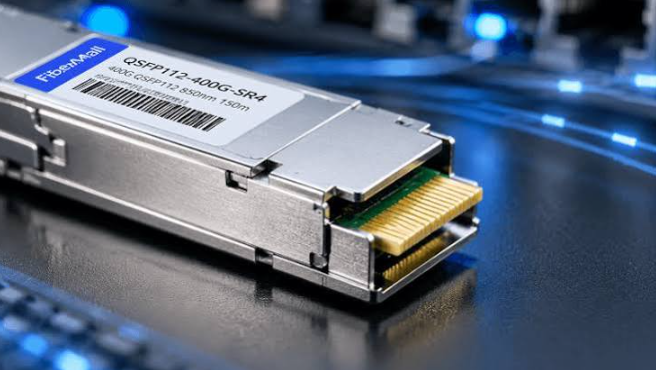
Is QSFP112 Backward Compatible? What 400G Ports Really Do with Older QSFP28 Optics
The short answer is yes—but only in one direction, and only when the host platform is built for it. QSFP112 backward compatibility is one of the most misunderstood topics in data center upgrades because the physical connector is intentionally familiar. A 400G QSFP112 module slides into a cage that looks almost identical to a QSFP28 cage, so it is natural to assume the electronics follow the same rules. They do not. The compatibility that matters is not whether a module fits, but whether the host ASIC, SerDes, firmware, and network operating system can speak the electrical language the module requires. Once that distinction is clear, planning a 100G-to-400G transition becomes far less risky and far more cost-effective.
The Direction Rule: Newer Ports Accept Older Modules, Not the Reverse
The single most important principle is that backward compatibility flows from the newer port toward the older module. A QSFP112 host port—found on platforms such as NVIDIA ConnectX-7 adapters, BlueField-3 DPUs, and Spectrum-4-based switches—can often accept existing QSFP28 and QSFP56 modules and run them at their native speeds. That means a 100G SR4 QSFP28 module can be reused in a QSFP112 cage and will operate as a 100G link, provided the switch or adapter supports the required lower-speed port mode. The reverse, however, does not work. A standard 400G QSFP112 transceiver inserted into a legacy QSFP28-only port will usually be detected at the management level but will fail to establish a link, because the older host cannot generate or receive the 112G-class PAM4 signaling the module needs.
This asymmetry has real operational consequences. When you plug a QSFP28 SR4 module into a QSFP112 port, that port effectively becomes a 100G port. That is useful for coexistence during a phased migration, but it is dangerous for capacity planning if your oversubscription models assumed 400G per port. The practical takeaway is simple: newer ports are the bridge to older optics, not the other way around.
See also: How to Cultivate a Fun and Engaging Social Life
Physical Fit Is Only the First Layer of Compatibility
QSFP112, QSFP56, and QSFP28 share the same four-lane QSFP family dimensions—roughly 18.4 × 89.4 × 8.5 mm—and the same cage and connector footprint defined by the QSFP112 MSA. This mechanical commonality is deliberate: it allows operators to preserve existing fiber plant and front-panel density while upgrading host hardware. But a successful insertion tells you almost nothing about whether the link will come up. Compatibility actually operates across four layers: mechanical fit, electrical signaling, protocol and management, and software support. A failure at any layer prevents the module from working, even if the other three are satisfied.
The electrical layer is where most deployments stumble. QSFP28 modules such as 100GBASE-SR4 QSFP28 optics use four electrical lanes running at 25.78 Gb/s per lane with NRZ signaling, for an aggregate 100G. QSFP112 modules, by contrast, use four lanes at approximately 106.25 Gb/s per lane with PAM4 modulation, delivering 400G aggregate. NRZ encodes one bit per symbol using two amplitude levels; PAM4 encodes two bits per symbol using four levels, which doubles throughput without doubling the symbol rate but places far tighter demands on signal integrity, equalization, and forward error correction. No firmware update can turn a 25G NRZ SerDes into a 100G-class PAM4 SerDes; the capability must exist in the host silicon and the surrounding electrical design.
The 100G SR4 Module Remains the Workhorse of Coexistence
For many organizations, the 100G QSFP28 SR4 module is the practical center of this transition. It operates over multimode fiber at 850 nm, uses an MPO-12 connector, and reaches up to 70 meters over OM3 fiber or 100 meters over OM4 fiber. Its power consumption is modest—often under 3.5 W—and it is widely deployed across switches, NICs, and storage fabrics. Because QSFP28 SR4 optics are already installed in large volumes, their ability to run inside QSFP112 ports gives operators a graceful path: they can introduce 400G-capable hardware without immediately replacing every 100G optic, then retire those modules as bandwidth demand grows.
The key is that the QSFP112 port must support multi-rate operation. A multi-rate SerDes can negotiate down to 25G NRZ per lane, allowing the legacy 100G QSFP28 module to operate at its native rate, while still being capable of 100G PAM4 per lane for native 400G QSFP112 modules. Not every QSFP112-capable platform enables this by default. Some vendors expose lower-speed modes through specific NOS releases or configuration profiles, and older platforms may not include the necessary firmware to interpret newer module management data. The module being “backward compatible” on paper is not enough; the host must be configured and validated to accept it.
What to Validate Before Mixing 400G Ports and 100G Modules
Before committing to a mixed 100G and 400G environment, verify the host platform at the model level, not just the ASIC family. Ask four questions. First, does the specific switch, router, NIC, or DPU support QSFP112 cages with multi-rate SerDes? Second, does the installed NOS version recognize 100GBASE-SR4 QSFP28 and QSFP28 SR4 modules in those cages, and does it expose the required 100G port mode? Third, are the FEC and CMIS management settings aligned with the older module’s capabilities? Fourth, has the combination been tested for thermal and power behavior? A QSFP112 cage is designed for higher per-lane signaling and may have different airflow assumptions than a legacy QSFP28 cage, even though the module dimensions match.
It also helps to separate the two upgrade questions that often get tangled. One question is whether a new 400G platform can absorb existing 100G optics—usually yes, with the right port configuration. The other is whether an existing 100G platform can host a future 400G optic—almost always no, because the legacy host lacks the PAM4 SerDes and signal-integrity budget. Treating these as the same question is how teams end up buying modules that fit but cannot link.
In practice, the safest migration strategy is to deploy QSFP112-capable hosts first, validate a small number of 100G QSFP28 and 100G SR4 QSFP28 modules in those ports, and then introduce native 400G QSFP112 optics as the fabric is ready. This sequencing preserves existing investments, avoids rip-and-replace fiber costs, and keeps capacity planning honest about what each port is actually delivering. Physical compatibility gets a module into the cage; electrical, protocol, and software compatibility are what make the link useful.